Skip to content

Index

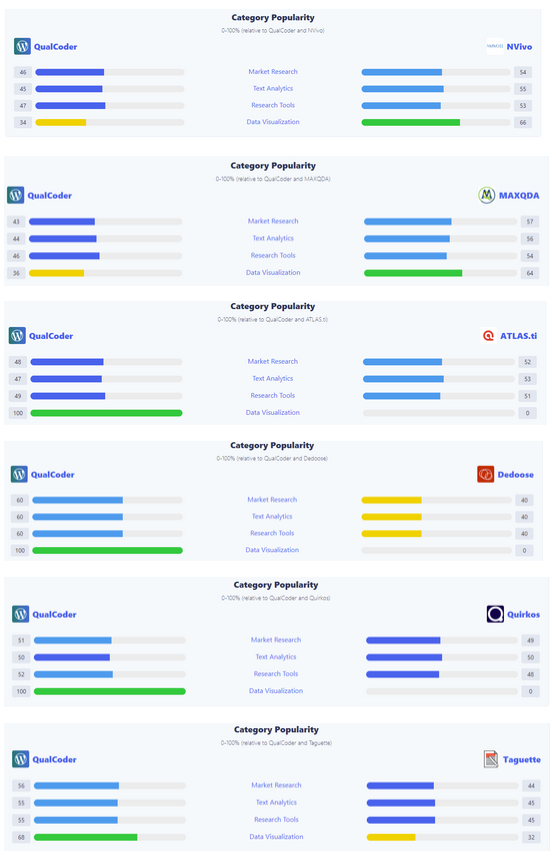
Comparisons with similar software

SaaSHub shows comparisons between similar functioning software.

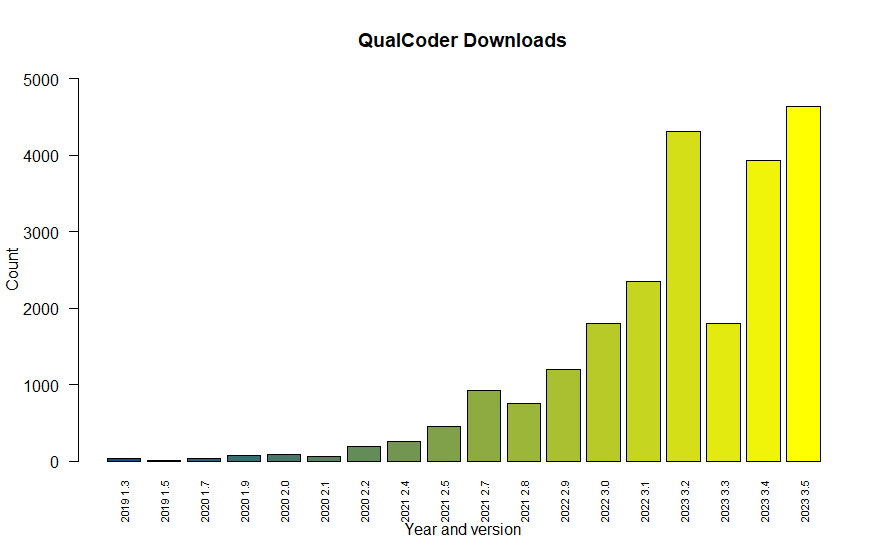
QualCoder is a favourable comparator to many paid and open software products. Charts below were from 28 June 2024.

QualCoder 3.5 released

The latest QualCoder software, version 3.5, has been released. This included executable files for Windows 10/11 and Ubuntu 22.

Main changes are some bug fixes, a word cloud option and an exact text matches report where multiple codes are applied to the same text.

Some errors have been identified post-release:

The Code Audio/Video Segment right-click context menu does not work when using the Windows exe. (a brief flash then disappears). Download and run the source code instead, if this is a feature you need.

Issue with the python vlc module with Fedora 39. Unable to resolve this.

Issue with installing pyqt6 on ChromeOS. Unable to resolve this.

https://github.com/ccbogel/QualCoder/releases/tag/3.5

A PDF manual of the 3.5 release can be purchased from:

https://www.buymeacoffee.com/ccbogelb/extras

Wordclouds

Qualcoder can now create wordclouds using its own wordcloud code. All words will be presented horizontally, and there are options for sizing the image, colour ranges, and using one word up to phrases of 4 words.

Also a 3.5 release version is coming out very soon.

QualCoder 3.4 Released

The latest update to QualCoder has been released.

Install from source code or use the Windows exe.

Details of changes are described on the link page. The major change is the ability to view, and code the text of pdf pages, presented roughly in a pdf format.

The second bigger visual change, is that the journals window is now a floating window. This makes it easier to enter journal notes while viewing coding, and coding reports.

https://github.com/ccbogel/QualCoder/releases/tag/3.4

PDF display and coding

Hi all,

QualCoder uses pdfminer.six for the pdf text extraction. Thanks to the maintainers of that project.

People have asked that direct pdf coding be an option. I can see the advantage is when coding text, you can see where the text is located near other text and images on the page. However, this is quite a challenging request.

The challenges: Unlike Microsoft Word or LibreOffice Writer or plain text documents, Pdfs are very different. They are designed in a print format and not designed to have text extracted. Some Pdfs may present the text as a full page image -- so text extraction is not possible without using optical character recognition software. This will not be an option in QualCoder -you would have to do this separately and import the plain text. Where there is text on a Pdf page, the text does not naturally flow from one bunch of words to the next like in a Word document. Instead the text is displayed in text box chucks with x and y coordinates to position each text chunk on the page. Text extraction, like using pdfminer, estimates what the next flowing bit of text is, based on these x, y coordinates. This can be good and it can be wrong sometimes too.

I am experimenting with displaying a pdf, within the Qt graphics interface that is used by QualCoder. This uses pdfminer, so I work within the limitations of pdfminer and my limitations of re-interpreting a pdf and using pdfminer. The intention is to allow some text coding directly using a mouse with the pdf.

So far, pdf rendering is adequate I think, to be able to perform text coding.

There are quite a few limitations regarding displaying the graphics -- Images and Polygon shapes. Pdfminer does not find all the images on a page and some images appear to be like photo negatives. Often images have a mask to display a portion of the image and not the full image -- I cannot work this out yet. Other problems I have come across, is the order of displaying items, particularly, lines, rectangles, curves and images when overlapping. Curves are polygons which require extra instructions to display correctly. I have selected one font to display text as using Pdf fonts is not possible for now. Also, each character within a text box can have its own formatting (colour, size, emphasis), so most of this is ignored and formatting is estimated for the entire text chunk.

This is an example pdf page with a lot of graphics (images, lines ,rectangles, and curve objects). My experimentation with pdfminer is on the right, the original is on the left..

![]](/images/with_graphics.jpg)

Below is an example of a primarily text filled pdf. The rendering is a lot more similar to the original. The image on the right is my experimentation and the image on the left is the original. At the bottom of the image you can see I added some check boxes to show or hide some of these additional objects (text, lines, rectangles, curves, images) that are rendered on the page.
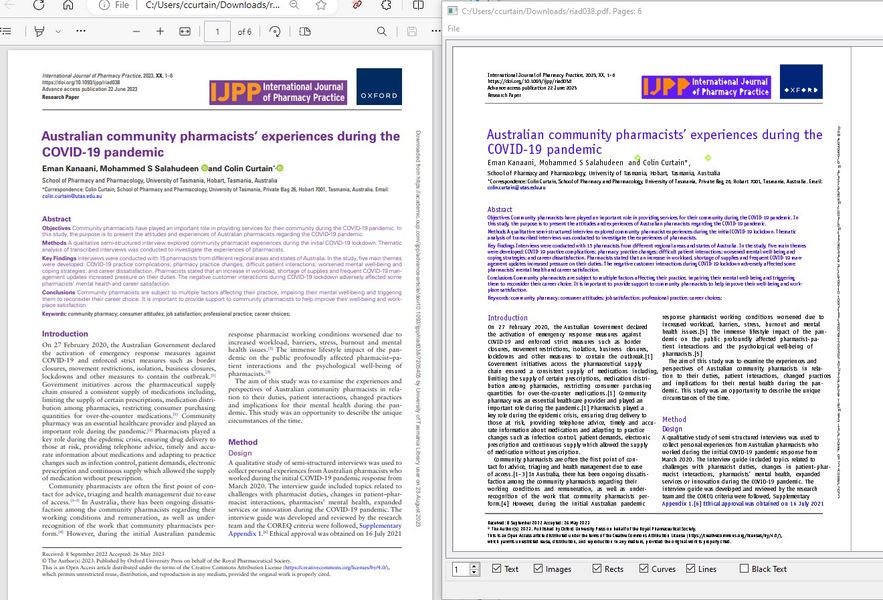
Next I am trying to select text. The approach for now is to drag the mouse over an area to select the individual text boxes that make up the text portions of the pdf. Then try to match those with the plain text import of the pdf. This will be a first approach to then apply coding to the text of those selected text boxes.

QualCoder 3.3 Release

The latest release of QualCoder is now available. There are binaries for Windows 10/11 and Ubuntu 22.

https://github.com/ccbogel/QualCoder/releases/tag/3.3

The changes are detailed below:

Main

Import a codes list from a plain text file. One code name per line. No categories are applied.

Accessibility

Throughout -- added more key shortcuts. Under Help there is an option to display all the key shortcuts.\ The colour selector shows how code colours can be seen with different types of colour impaired vision.\ Under Coding menu there is a new window called Colour scheme. This allows a range of selected colours to be applied to a range of codes. This area also shows how the colours may be seen by people with different types of colour impairment.

Manage files

Can hide columns by right-click on the table header row for options to hide that column or to hide columns beginning with specific text. Or to show columns where the column name starts with specific text.\ Can assign a file to a case via right-click menu when in the cases column.\ Can right-click on a URL in an attribute and open the URL with the default web browser.\ Faster table filling.

Twitter data

Import twitter data from a fully quoted csv file.\ Example file in Examples folder.\ Requires these exact column names: id and full_text headers for tweet data and screen_name for user data.\ Additional tweet fields can be these exact column names:\ created_at, coordinates, retweet_count, favorite_count, lang\ Additional user fields can be:\ location, url, description, followers_count, friends_count, listed_count, favourites_count, statuses_count

The twitter import page also has an example of how to use R with RTweet to extract tweet data. This was tested and worked before twitter applied a fee for service. Note that currently there is a cost associated with accessing twitter data. I cannot give advice on any problems you may have getting twitter data.

The tweet data is loaded into individual database files (Manage Files), The user data is loaded into cases (Manage cases). Multiple tweets (stored as files are assigned to the matching user (case).

Manage cases

Faster table filling\ Can hide columns by right-click on the table header row for options to hide that column or to hide columns beginning with specific text. Or to show columns starting with a text value.\ Can order by case name or by attribute value, ascending or descending.\ Can hide rows by right-click menu and selecting a text value that equals or 'is like' some chosen text.

Case file manager

Some improved functions in this dialog include a check box to hide assigned files. The right hand side text edit will fill with any file text when the file is selected in the left hand side table.

Journals

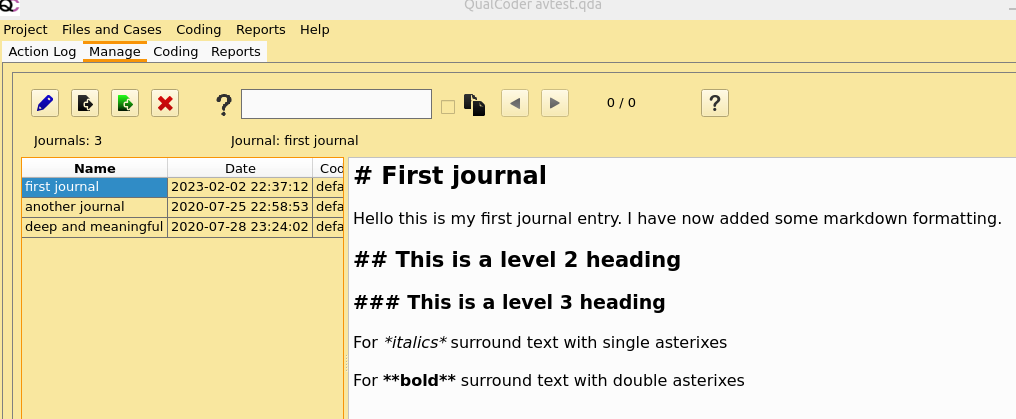
Some markdown is enacted to make viewing journal entries nicer:\ #, ##, ### for heading levels\ text for bolded text\ text for italic text

Code text

'in vivo' coding added. Selected text becomes the code

Colour scheme

Opening original text documents

QualCoder imports plain text from Word, ODT, PDF documents. PDF importing can often be a problem and require editing after importation, as the PDF format is for print display not for text editing.

Now, with new projects, using the future 3.3 version, you will be able to open and view the original text document, from the Manage File and Code Text areas. The documents are opened by your default browser. So some will appear in the browser itself, and some documents will make the browser open the document using Microsoft Word or LibreOffice Writer, depending on which of these you have installed.

You can install the latest QualCoder code using the green download button and doing a manual install.

Older projects

Older projects will not have this option, but it can be added using database queries in the Reports > Database queries section

You will need to run sql statements that link the database entry to the text document stored in the project folder:

First save a copy of the project. This is a safe thing to do, in case your sql updates were incorrect.

Then run a sql statement like this example:

Lets say you imported a pdf called mypdf.pdf and that in the documents folder inside the qualcoder project folder it is there as mypdf.pdf

Then in Settings tick 'showids'

Open Manage Files and see what the id number is for that entry. Lets say it is 5, as an example.

The below statement will update the entry to then be able to link and open that text file, when you use the menu option of viewing the original file.

update source set mediapath="/docs/mypdf.pdf" where id=5

Then run the statement using the cogs button.

Refresh Manage Files by selecting Manage Files from the menu. and check that view original text is an option for that entry.

Markdown formatting in journals

I have added markdown formatting in journals.

It does show the markdown symbols, but does help to frame journal entries. Note this is for the unreleased 3.3 version, which can be downloaded and manually installed from the main GitHub page.

QualCoder 3 2 released

The latest version of QualCoder has been released. This contains error fixes and more functionality.

The main change is that the VLC software is not required to be installed for QualCoder to run. Without VLC you can work with text and images. For audio and video coding QualCoder does require VLC to be installed.

The other main change is that a bibliography can be imported in the RIS format.

Further improvements to the REFI-QDA codebook and project exchange formats have been enacted.

How to get the latest release?

Obtain source code or executable binaries for Windows 10/11 and Ubuntu 22 from:

https://github.com/ccbogel/QualCoder/releases/tag/3.2