Skip to content

Index

QualCoder compares favourably to proprietary qualitative data analysis software

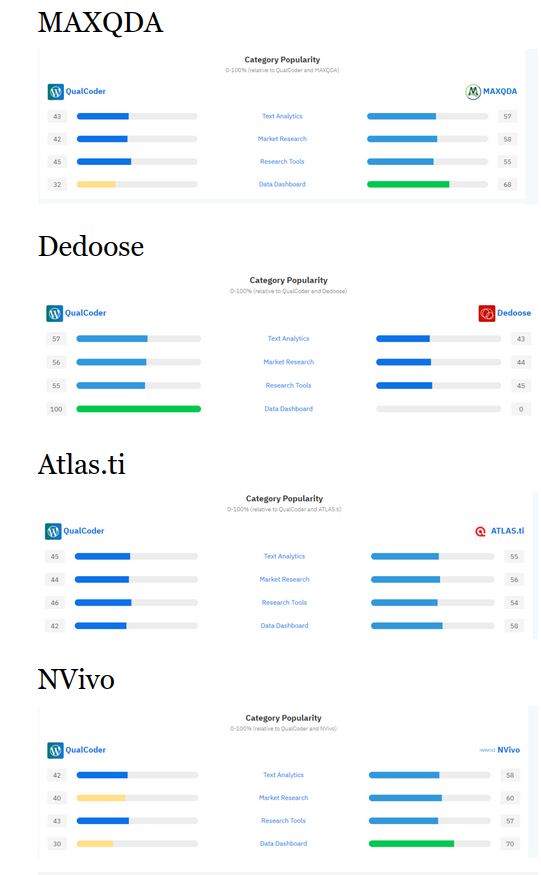
I am not sure how SaaSHub.com calculates the comparisons but here are a few graphs comparing QualCoder to the big proprietary names in qualitative data analysis. These screengrabs of the SaaSHub graphs were from 15 Dec 2022.

It is nice to see that QualCoder does compare favourably primarily as a research tool. Even if it does not have all the functionalities of the big names. A lot of thanks goes to the end users who keep putting forward good ideas and giving feedback to make using QualCoder an easier and better experience. Also for suggesting extra functionalities that had not been thought of before. It is fascinating to see how many different workflows people use when doing their research.

Latest updates

The latest code that will eventually become a 3.2 release has the capacity to load references from a text file. They must be in the RIS format which most reference managers can export to.

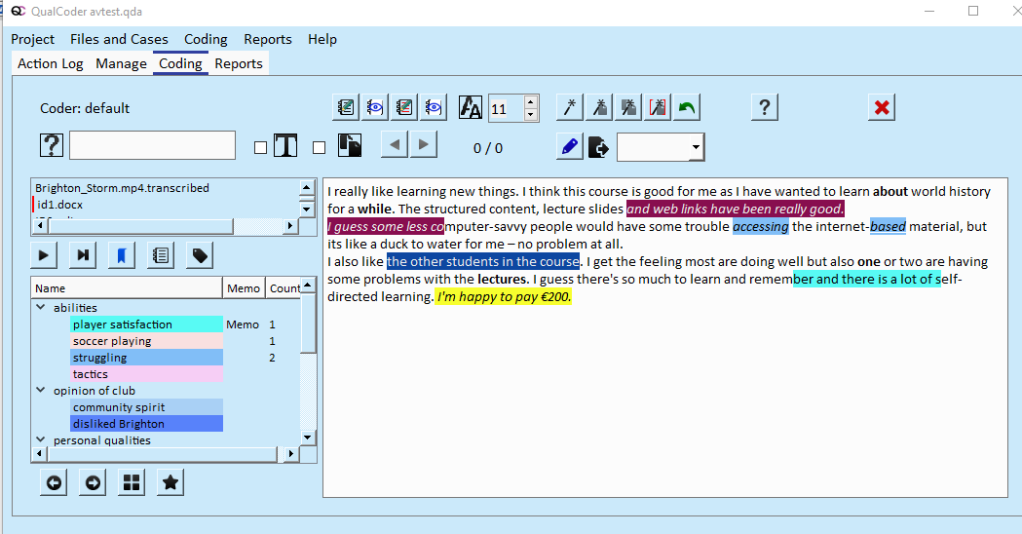
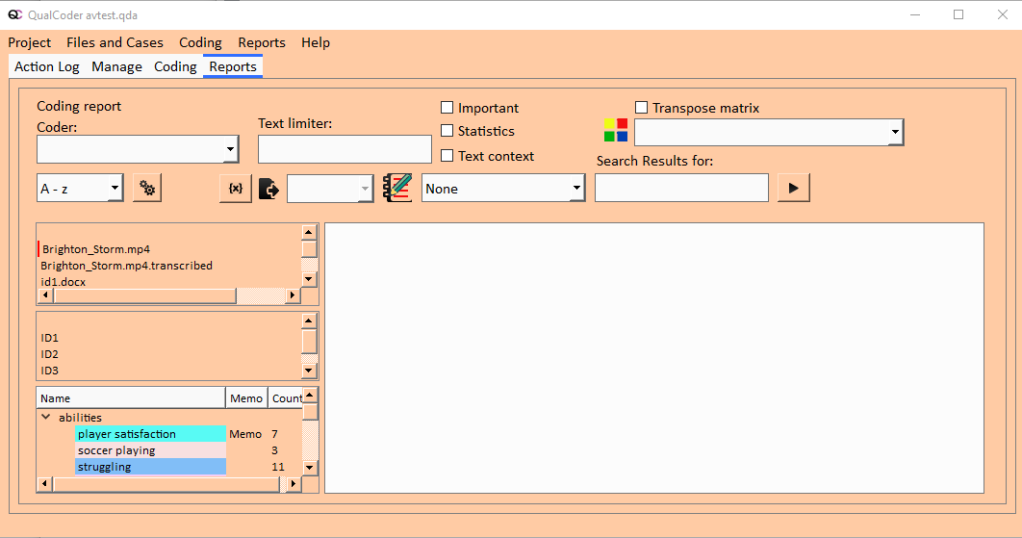
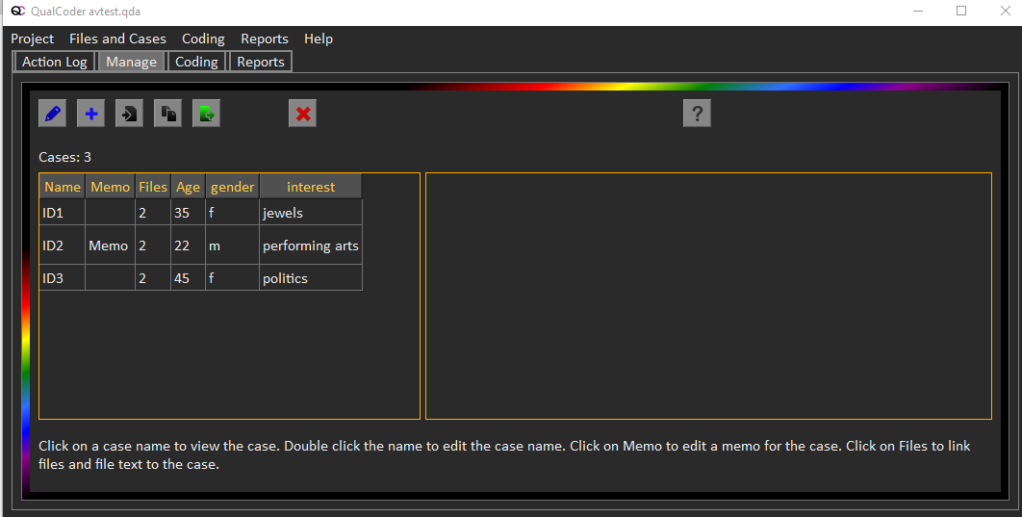
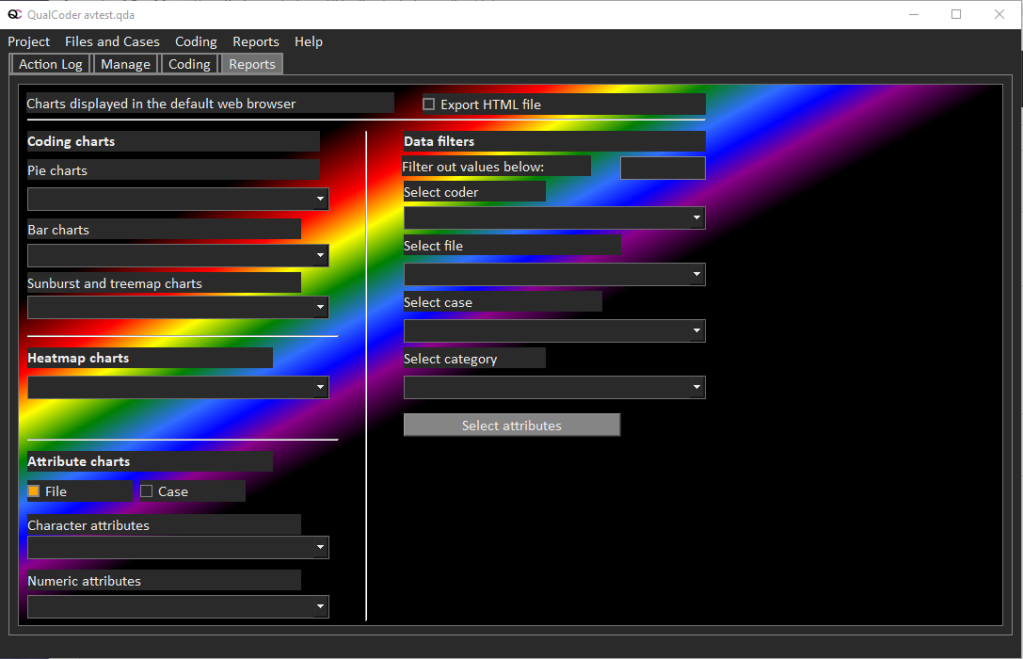
Additionally, you will be able to change the overall style of QualCoder through options in Settings.

Blue style

Orange style

Dark with rainbow style

QualCoder 3 1 released

Hi all, I have released a newer version of QualCoder:

https://github.com/ccbogel/QualCoder/releases/tag/3.1

There are Executables for windows 10 or 11 and for Ubuntu 22.04.

Most changes in this release are fixing bugs, adding a lot of user manipulations to the Graph, export the Results matrix. More are detailed on the webpage.

For those who install from the command line or terminal, you need to also install the python vlc package (use py or python3):

py -m pip install python-vlc

New facebook page and group for QualCoder

Hello everyone,

I have created a facebook page and group for QualCoder. The intention is for you to share your experiences using QualCoder. How to do things in QualCoder and describe problems using QualCoder and the solutions and work flows you have developed.

The group may become a good community to describe your research. The qualitative approaches you use, the data you have collected, and how you collected the data. How you interpret the data and the methodological approaches you use.

This is an updated link to a public group now.

https://www.facebook.com/groups/1251478525589873

Increased interest in QualCoder

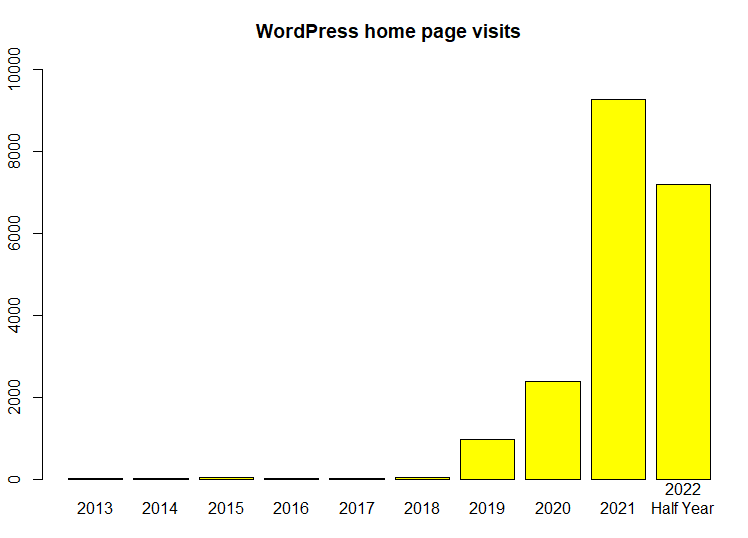
Visitors arriving at the home page on the QualCoder WordPress site have increased substantially over the years, since the earliest versions of QualCoder were released on GitHub.

I guess this shows increased awareness and interest in the software. It is also impacted by the Windows 10 exe releases which I began creating with pyinstaller during 2021. This year, 2022, looks like it will be on track to reach 14,000 visits by December.

QualCoder 3 0 Release

Hello everyone,

I have released QualCoder 3.0 today. I have only tested on Ubuntu 20.04 and Windows 10.\ You must have VLC installed. Optionally, install ffmpeg for speech to text and waveform image creation. (ffmpeg tested on Ubuntu only).\ There is an exe for Windows 10 and an executable for Ubuntu 20.04.

The graphical framework have been updated from Qt5 to Qt6.

Other changes:

Manage files

  • Rename database file name entry, function added.

Code text

  • Fixed uncaught IndexError exception when editing text positions.
  • Fixed AttributeError updating Tooltips in merge_codes
  • Export coded text file to odt or html. Does not export the tooltips (future work to do).

Reports

  • Added Charting function.
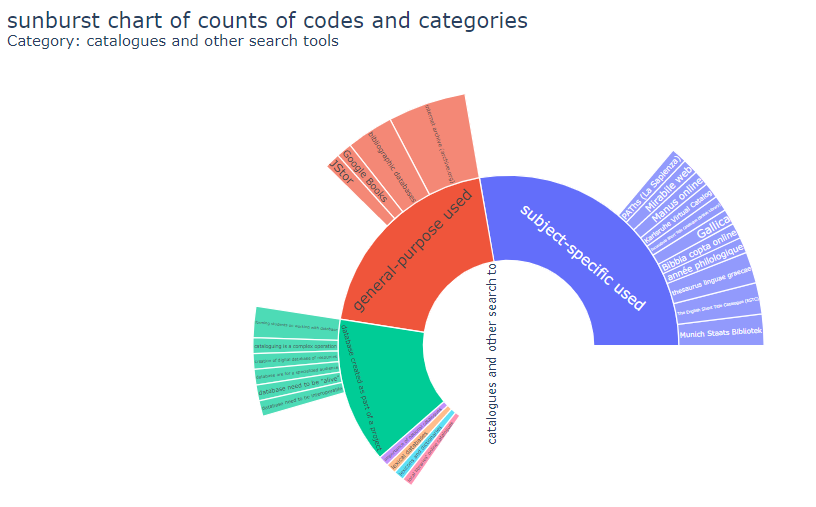
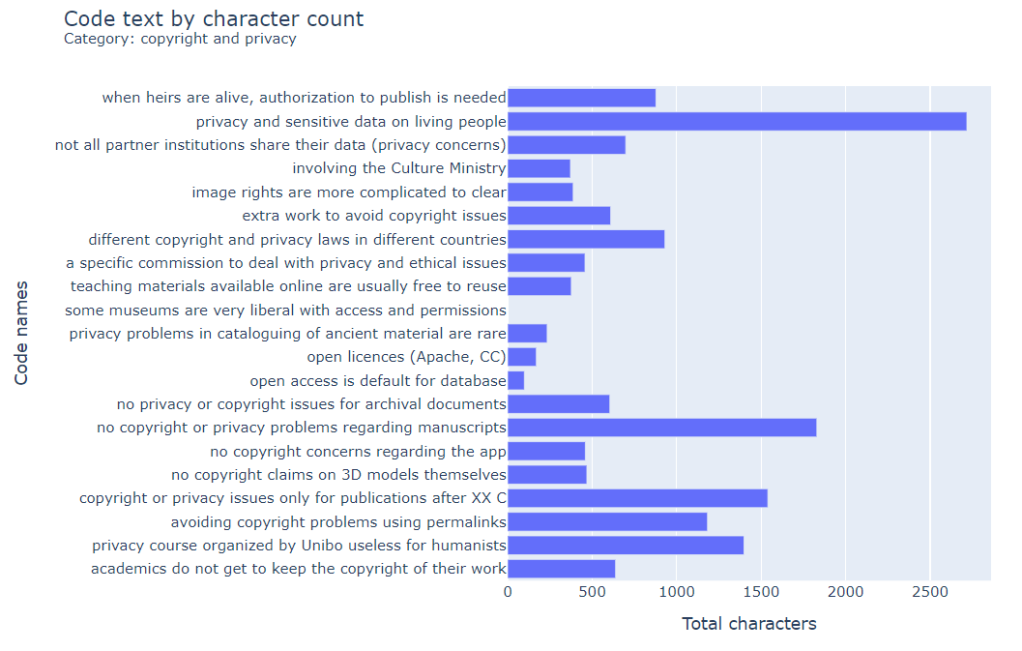
  • Pie, Bar, Sunburst, Heatmap and Treemap charts can be created and are displayed in the default web browser. Heatmaps are limited to 40 rows and 40 columns for nicer display and faster rendering.
  • Graph
    • Added right-click menu options to show files and cases as text objects.
    • Added right-click menu options to add extra free text objects and lines.
    • zoom +/- function.
    • Future work will be to save and load these user edited graphs within the database.

Special functions

  • Added ability to merge another QualCoder project into the current project. Always make a back up of your project first, just in case there is a problem.

Errors fixed

  • File deletion error -- SQL bindings mismatch -- fixed.
  • Uncaught IndexError exception when editing text positions from within code text -- fixed.
  • AttributeError updating Tooltips when merging codes- fixed.
  • Dark text on dark code colour in Code image fixed. Now shows white text. fixed.

Some upcoming 3 0 version features

QualCoder 3.0 will be able to produce a range of charts – pie charts, bar charts, treemap and sunburst charts. These are produced with plotly. The examples below come from the following dataset: What do we mean by “data” in the arts and humanities? Interview transcripts (University of Bologna, FICLIT) and GTM coding.

Currently in development are heatmap charts for cases or files against codings.

Move from Qt5 to Qt6

I have spent a few weeks working on this update. I have moved the graphical interface framework from Qt5 to Qt6 today.

While I have done a lot of testing to iron out any bugs from the move, it is possible bugs are present. Please post any bugs you find on the github issues page.

There are a couple of other update and error fixes that I have addressed also. I will probably put out a new 3.0 release in a month's time, to allow any Qt6 bugs to surface first.

QualCoder 2 9 release

The 2.9 version is now available through https://github.com/ccbogel/QualCoder/releases/tag/2.9

There is also a Windows 10 exe in the release.

Details of changes are listed below:

Manage files

New audio/video file.\ Option to use an online speech to text service if there is no transcription text present.\ This requires ffmpeg software to be installed.\ Fixed a time stamp error when inserting a time stamp on a transcription.

Added an automated search that looks through the user's home directory for up to 2 matching file names. This intended to speed up finding the link to files where the link is currently pointing to nothing.

Coding text

Added right-hand side side panel that shows three different information options:

  • Current code with code rule and examples of its use.
  • Current journal (most recent date) for reading and editing
  • Project memo for reading and editing
  • Underline applied to overlapping codes, for identification of overlaps
  • Added button to enter and exit the edit text mode
  • Added Ctrl + Z to restore the last coding that was unmarked.

Coding images

  • Added Ctrl + Z to restore the last coding that was unmarked.
  • Add menu option to resize and reposition a coded area.

Coding Audio Video

  • Added Ctrl + Z to restore the last coding that was unmarked.

Reports codes

Added statistics summary via check box\ Added options to the matrix. So can have codes/categories by file or by case.\ Added coding in context checkbox for text codings. This shows the surrounding 250 characters of text to help put the coded section in context in the report. The coded text is shown in bold.

View Graph

  • Added button to save graph as a png image.

Special functions

Dynamic text file replacement.\ For example, useful for updating a text file of a list of blog posts.\ The function works by looking for identical text segments in the replacement file to match the previous codings and annotations. If the replacement file contains multiple matches, then only the first match is used. So there is potential for inaccuracy. Tries to match any case assignment also. Again may potentially be inaccurate.

Settings

The number of project backups can be selected by he user.\ Changed how to selected another coder name and how to enter a new coder name.
New Icon

Thanks to Julius Reich for the smart and modern icon look for QualCoder:

.