Latest release
The latest source code and a Linux debian release are now available.
Changes include the RQDA project import function and various bug fixes.
https://github.com/ccbogel/QualCoder/releases
The latest source code and a Linux debian release are now available.
Changes include the RQDA project import function and various bug fixes.
https://github.com/ccbogel/QualCoder/releases
Several github people have asked for RQDA import. The feature has now been added to import RQDA projects. All data is imported except for the file categories tables.
The latest Linux debian file (version 1.4.1) also contains this feature https://github.com/ccbogel/QualCoder-Debians
I have added an option to audio/video coding where the media has multiple audio tracks. It is now possible to select from multiple audio tracks when viewing or coding a video. This is providing the video contains multiple audio tracks.
On Windows 10, the standard qualcoder with vlc does not run. I added a qualcoder_non_av folder so that Windows users who get an error with vlc can use this version instead. This version does not allow audio/video coding or viewing.
I think the key problem is some programs are written for 32 bit architecture and some are written for 64 bit architecture.
This means: If you have a 32 bit python installed and a 64 bit vlc installed (or vice-versa, a 64 bit python and 32 bit vlc) QualCoder will not run as the two architectures do not talk to each other.
The easiest solution is to install a vlc bit version that matches the python bit version. This should then allow QualCoder to first run and open, and secondly to work with audio and video.
This image shows I am running Python in 32 bit architecture:
python32.png
This image, from the task manager, shows vlc is running as 64 bit architecture. If it was 32 bit is would be noted as such in brackets.
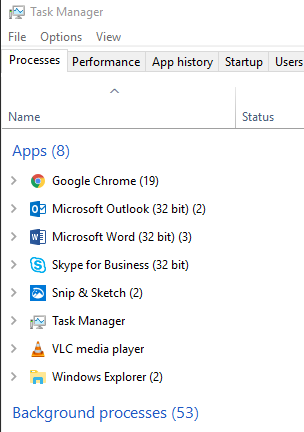
The latest Debian package qualcoder-1.4.deb is available from https://github.com/ccbogel/QualCoder-Debians
This is for easy instillation on Debian based Linux systems such as Debian, Ubuntu and Linux Mint.
It may not be standards compliant but it works. It creates an application launcher or you can run it from the terminal via the following command:
python3 /usr/share/qualcoder/qualcoder.py
Post updated 27 Oct 2019
Audio and video can be coded in the code_av dialog. One screen shows the video the other contains the coding and video controls. Coded segments are shown in the upper section of the pane. Hovering the mouse over a coded segment give you detail about that segment. Right-clicking brings up a menu where you can add a memo, play the video from that point, or delete the segment.
Audio and video files can be imported into QualCoder in the following formats: wav, mp3, mov, mp4, ogg, wmv.
You do need to have the vlc media player installed. See their site for details: https://www.videolan.org/vlc/
Or you can download through the Windows Store. Alternatively, on linux you can add vlc using the terminal (or run the install script):
sudo apt install vlc qtwayland5
Audio and video segments can be coded. Currently, the only way to obtain reports on coded segments or delete coded segments is through the sql_dialog window. Further work will be implemented to improve these functions.
The audio or video is shown in its own dialog window and the controls, codes and transcript is shown in a separate dialog, as illustrated below.
Testing of the various functionalities of QualCoder has been performed on Windows 10. Several minor issues were identified and resolved. Functionality appears to be error free.
One quirk is with exporting reports using ODT file format (this is the default format for LibreOffice) and then opening the ODT document with Microsoft Word rather than LibreOffice. If the report contains multiple images, the images in the document when opened using Word overlap. This can be fixed within the opened document by moving the images around. Below is an example of overlapping images in ODT format opened with Word:
It was recommended that I make a user manual. So I have spent some time and written a QualCoder User Manual in PDF format. The manual is in English. This can be found on the github site: https://github.com/ccbogel/QualCoder
In the coding reports a case matrix is now available. Select your codes and categories and cases as normal. The run the Search.
The output will show the codings on the left and on the right a case matrix table is shown. The matrix shows each case as a row and each top-level category (or theme) as a column. Each cell in the matrix show the coded text and images.
matrix1.pngThe code selection tree may be hidden on the left-hand side of the window, you can drag this across with the mouse. Similarly, you can drag the matrix to fill the screen.